When managing a network, you often need to control which traffic is allowed or denied.
A Standard Access Control List (ACL) filters IPv4 traffic solely based on the source IP address.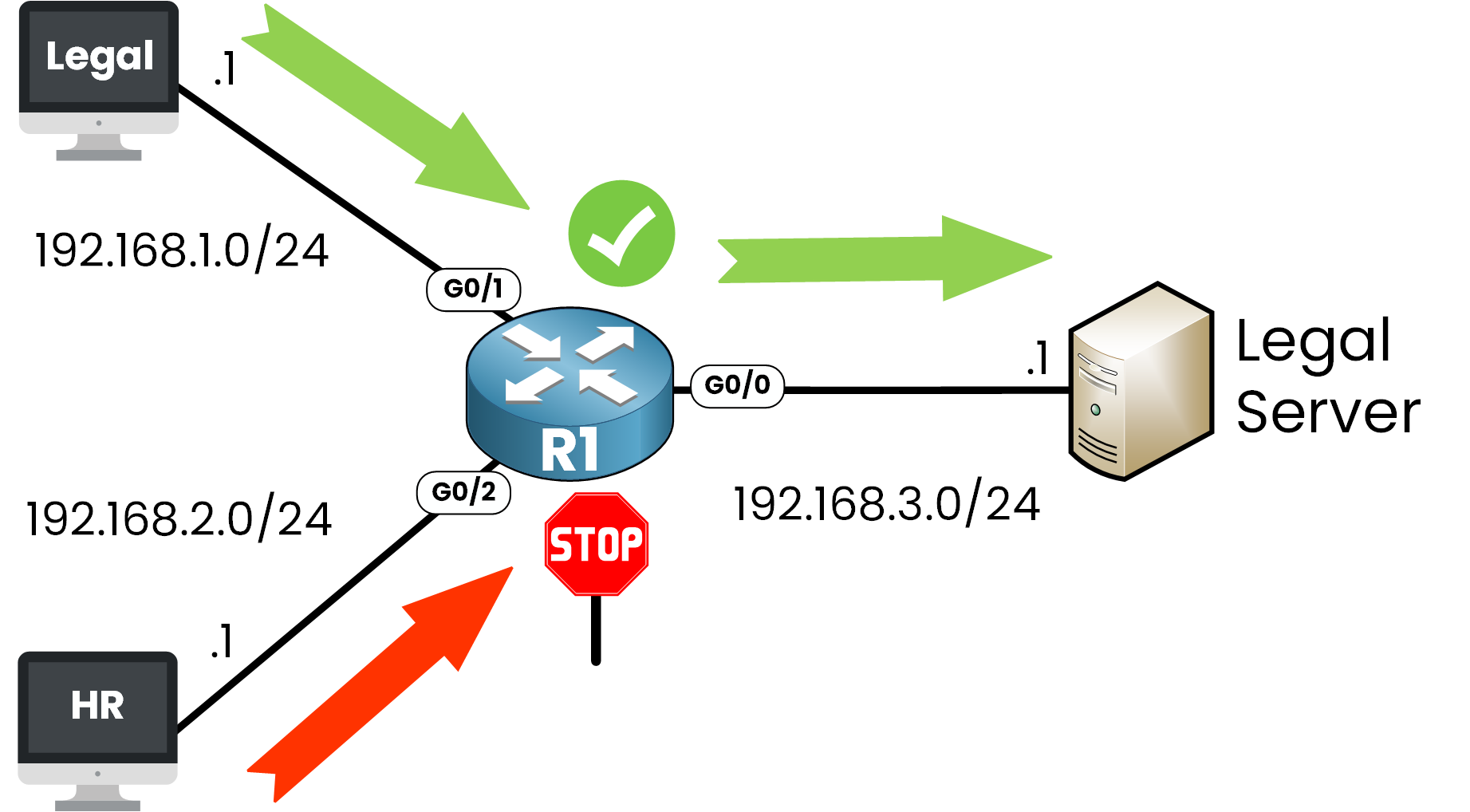
Figure 1 – Standard ACL Use Case
In the example below:
The Legal network (192.168.1.0/24) is allowed to access the Legal Server (192.168.3.1).
The HR network (192.168.2.0/24) is denied access to that same server.
This is a perfect use case for a Standard ACL, you only care about who is sending the traffic, not where it's going or what kind of traffic it is.
Answer the question below
What does a Standard ACL use to filter traffic?
Now that you understand what a Standard ACL is, let's walk through how to configure one step by step on a Cisco router.
Step 1 - Enter global configuration mode
R1# conf t
Enter configuration commands, one per line.  End with CNTL/Z.
Step 2 - Create the Standard ACL
To create a Standard ACL, use the ip access-list standard command.
R1(config)# ip access-list standard ?
  <1-99>        Standard IP access-list number
  <1300-1999>   Standard IP access-list number (expanded range)
  WORD          Access-list name
Here we choose the number 10, which is part of the valid ranges for Standard ACLs:
From 1 to 99 (classic range)
From 1300 to 1999 (expanded range)
R1(config)# ip access-list standard 10Step 3 - Permit the Legal network
We want to allow traffic from the 192.168.1.0/24 network.
Let's see the available options:
R1(config-std-nacl)# permit ?
  Hostname or A.B.C.D  Address to match
  any                  Any source host
  host                 A single host address
Here we choose to match a network address:
R1(config-std-nacl)# permit 192.168.1.0 ?
  A.B.C.D  Wildcard bits
  log      Log matches against this entry
We'll match a the network using a wildcard mask:
R1(config-std-nacl)# permit 192.168.1.0 0.0.0.255This line matches any host from 192.168.1.0 to 192.168.1.255.
Why 0.0.0.255?
In ACLs, we don't use subnet masks, we use wildcard masks.
A wildcard mask is the inverse of a subnet mask. It tells the router which bits to ignore when comparing IP addresses.
R1(config-std-nacl)# permit 192.168.1.0 0.0.0.255Subnet Mask
Wildcard Mask
Matches
255.255.255.0
0.0.0.255
All IPs in a /24 subnet
255.255.255.255
0.0.0.0
One exact IP
Table 1 – Subnet Mask vs Wildcard Mask in ACLs
So:
permit 192.168.1.0 0.0.0.255 => allows the whole 192.168.1.0/24 network
permit 192.168.1.10 0.0.0.0 => allows only 192.168.1.10
Step 4 - Deny the HR network
Now we block all traffic from 192.168.2.0/24:
40 % Complete: you’re making great progress
Unlock the rest of this lesson
If you’d like to continue your CCNA journey, simply create your free account.
Access all CCNA lessons
Practice with hands-on labs
Train with Practice exams and Quizzes
Progress tracking in your dashboard
Made by network engineers - CCNP certified
learners globally